A Home That Keeps Its Own Maintenance Calendar
What you get, what you do, and how it works: an assistant that turns your photos into a register and calendar, a log you update by saying "done," and automations for leaks, cold and damp, with the safety calls left to you.
The short version. Most home upkeep fails the same way: nobody remembers when the filter was last changed, the water heater manual is in a drawer somewhere, and the leak under the sink is found a week late. The old fix was a binder and a spreadsheet nobody kept up. The new one is an assistant that does the filing for you. You walk the house with your phone; photograph rating plates, and also the paper pile itself — manuals in the junk drawer, warranty cards, install paperwork, old invoices — and it reads them, files them into one shared folder, and builds the register and the calendar from that. When a job gets done, you say so out loud, send a text, forward the invoice or snap a picture, and it updates the log and sets the next reminder. A few sensors handle the problems that cannot wait. Safety calls stay with you and qualified help. One weekend sets it up, and after that the upkeep mostly takes care of its own paperwork.
What you get
Start with the payoff. When this is running, the house keeps its own maintenance calendar, tells the right person when a job comes due, reacts on its own to the handful of problems that cannot wait, and never asks you to open a spreadsheet.
How you do it, and how it works
Eight steps follow. Each one has two halves. You do is the part you walk, photograph, say or decide; most of the typing belongs to the assistant. Under the hood is what that step makes the system do, so you know why it is there and what breaks if you skip it.
Any AI assistant that can read photos and documents and keep notes will do. Use the one already on your phone, or the one wired into your smart-home app or email. Steps 1 to 3 need nothing but that, a phone and a shared calendar. Steps 4 to 6 add smart-home gear. Steps 7 and 8 keep it honest. No assistant? Every step still works by hand, it just takes longer; the fallback is noted where it matters.
Step 1: Walk the house and let the assistant build the register
Take your phone room by room, including the basement, attic, garage and outside. At each appliance or system, photograph the rating plate (the sticker with make, model and serial number) and, if it has one, the filter frame. Also photograph the water main shutoff, gas shutoff and breaker panel. Talk as you go if that is easier: "This is the downstairs furnace, we bought it in 2019."
Then open the drawer where the paper lives. Photograph the physical manuals, warranty cards, install paperwork and old invoices — one clear shot per document, or a quick flip through the booklet. You do not have to name them; the pile is the point.
Hand the whole camera roll to your assistant: "Build a register from these. Item, location, make, model, serial, filter size. Read every document photo, file the PDFs into our shared folder by appliance, and pull the intervals and warranty dates from them. Look up a digital manual only where we do not already have paper." It reads the plates and the pages, organizes what used to be a stack, and asks you only about what it could not read.
No assistant? Same walk and same photos, then type the plates into a simple table and drop the document images into a shared folder by appliance.
The model number is the key that unlocks everything else. It matches the right manual — including the one you just photographed in the drawer — and the manual is where real maintenance intervals come from, not a generic checklist off the internet. Reading a model number off a blurry sticker, or a warranty date off a folded card, is exactly the kind of fiddly job an assistant does well and people put off for years.
A register built from rating-plate and document photos also survives you: a partner, a house-sitter or the next owner can read it, and they never have to dig through the same drawer. And the shutoff photos earn their place the first time something goes wrong. In an emergency nobody wants to search for the main water valve with a flashlight; they want to ask "where's the water shutoff?" and get the photo.
Step 2: Let the manuals become a calendar
Ask the assistant to read every manual in the folder — the ones it filed from your document photos, and any it fetched: "Pull out every maintenance task with its interval and the page it came from. Where a manual is silent, use a recognized guide and say which one." For example, NFPA advises testing every smoke alarm once a month and replacing smoke alarms 10 years after their manufacture date.
Your job is the part only you know: when things were last done. Answer in whatever way is quickest. "The chimney was swept two winters ago." "No idea about the water heater." Forward an old invoice email, or photograph the paper copy still in the file cabinet. Anything you cannot answer stays unknown, and that is fine.
The calendar is one sum, repeated: last done + interval = next due. Every task then falls into one of three groups, and the third group is the most useful thing on the page.
A page number on every interval keeps the calendar from drifting toward folklore ("change it every month, I think") and keeps the assistant honest too: if it cannot point to a page or a named guide, the interval goes in unknown rather than being made up. When someone asks why a job is on the list, the answer is a manual page.
Step 3: Give every job an owner and a reminder that fires
Tell the assistant who does what, in plain words: "Filters and smoke alarms are mine, gutters are Sam's, the furnace service goes to the HVAC company." It puts each recurring task on the calendar or to-do app your household already shares, as a repeating item assigned to one named person. Add one short weekly slot, a "house check," where whoever is on duty clears that week's items.
Changing your mind later is one sentence: "Move the gutters to me this fall."
A reminder nobody owns gets dismissed by everybody. Assigning each job turns "someone should" into a name on a calendar, and the weekly slot gives small jobs a home so they do not pile up.
This is also where the system's one hard rule lives: no proof, no "done." Snoozing or dismissing a reminder does not count as finishing the job. Only a receipt, a photo or your own word that it is done closes it, and that date, not the reminder's date, feeds the next due date in step 2. Step 7 shows how little effort that word takes.
Step 4: Put sensors where water, cold and damp go wrong
Start small, at the places that cause the most expensive surprises:
- Leak sensors on the floor beside the water heater, washing machine, dishwasher, and under sinks.
- Temperature sensors wherever pipes run through cold space: a crawl space, an unheated garage, an exterior wall cabinet.
- A humidity sensor in the basement or any room that smells damp.
- Interconnected smoke and CO alarms, if you do not already have them, so that when one sounds, they all sound.
Pair the sensors with whichever smart-home hub or app you already use, then tell the assistant what you put where ("leak sensor under the kitchen sink, temperature sensor in the crawl space"). It adds them to the register and puts their battery checks on the same calendar as everything else.
A sensor turns a slow, invisible problem into an event the house can react to. Water and moisture are the clearest case: EPA advises keeping indoor humidity below 60 percent, ideally between 30 and 50, and drying anything wet within 24 to 48 hours, after which mold becomes likely. A sensor that reports in minutes instead of days keeps you well inside that window.
Interconnection matters for alarms for the same reason. NFPA recommends it, so an alarm in the basement is heard in the bedrooms.
Step 5: Wire the automations
In your hub or app, build each automation from three parts. If your hub has an assistant built in, you can often just describe it: "When any leak sensor gets wet, close the main valve and alert everyone's phone." Start with these:
- Leak: when any leak sensor reads wet, then close the motorized main water valve (if you have one), alert every phone in the house, and log the time.
- Damp: when basement humidity stays above 50 percent for half an hour, then run the dehumidifier.
- Cold: when a pipe-space sensor drops below the threshold you choose, then alert the house so someone can open cabinet doors or let a tap drip.
- Filter: when the thermostat's filter-runtime count hits the number you set from the manual, then remind the filter owner.
Test each one on purpose: touch a wet cloth to the leak sensor and watch what happens.
Every home platform describes automations the same way, whatever it calls them: a trigger, an optional condition, and an action. Once you see the shape, you can read or build any of them, and check that what an assistant built is what you asked for.
The filter example shows why runtime beats the calendar for some jobs: a furnace that ran hard through a cold snap clogs its filter sooner than one that sat idle in a mild month. Where your thermostat counts runtime, let the usage drive the reminder.
Step 6: Decide what never runs on autopilot
This is the one step that is all you. Sort every automation you are tempted to add into one of three bins, and tell the assistant the bins so it holds to them too:
Automate
- Reminders on the shared calendar
- Alerts from sensors to phones
- Shutting off water on a leak
- Running a dehumidifier or fan
- Filing the log and setting the next date
Ask first
- Booking a service visit
- Buying parts or filters
- Changing a schedule or an owner
- Turning off a reminder for good
You and a qualified pro
- Anything involving gas
- Electrical work beyond a plug-in device
- Deciding whether something is safe to use
- Silencing, disabling or overriding an alarm
If something smells of gas, smokes, sparks, or puts water near electrics, the only automation is an alert. People leave, and the right professional or emergency service is called.
The test for automating an action is simple: is it harmless if it fires by mistake? A water valve that closes on a false alarm costs you a shower. A log entry filed on the wrong day costs a one-line correction. A heater that switches on by mistake, or a safety device that gets silenced, can cost a great deal more. Add one rung at a time, and only once the rung below has become boring.
Step 7: Done? Just say so
This is where the old way fell apart: finding the log, opening the spreadsheet, typing the date, filing the receipt. Now you just tell the assistant, however is handy at the moment:
- Say it to your phone or speaker while you are still on the ladder: "Changed the furnace filter, the 16 by 25 one."
- Text it: "gutters done."
- Forward the email when the plumber's invoice lands.
- Snap a photo of the new filter with the date written on the frame, of the receipt on the counter, or of the warranty card that came in the box — same move as the drawer pile in step 1.
The assistant files the entry (date, item, what was done, who did it, proof), drops any new document into the right folder, updates last done, works out the next due date and moves the reminder. If something is missing, it asks one short question back: "Which bathroom?"
No assistant? Add a line to the log yourself, with the receipt, the same day. It works; it is just the part people stop doing.
The log is what keeps the calendar honest: its dates are the "last done" half of the sum in step 2. That is why capture has to be effortless. A log you have to go and find gets skipped, and a skipped entry quietly breaks the next due date.
Your own word counts as proof; a dismissed notification does not. The log also pays off in three other places. Warranty claims usually ask for proof of maintenance. A technician diagnoses faster when they can see what was done and when. And at resale, a house with a dated maintenance record answers questions before buyers ask them. Ask for it any time: "Show me everything done to the water heater."
Step 8: Give the assistant its limits, then its paperwork
By now the assistant is doing the dull reading and filing. Write its limits down in plain words, once, and keep them where the household can see them:
- Cite a page or a named guide for every interval; otherwise mark it unknown.
- Never mark a job done without a receipt, a photo or a person saying so.
- Never diagnose, give repair steps, or say something is safe.
- Never contact, book or buy anything without asking first.
Then let it take the rest of the paperwork. When something seems off, describe it however you like ("the water heater is making a popping sound") and ask for a service brief: model and serial, what you observed, past work from the log, the filed manual or warranty page, and questions for the technician. Ask it each month for the unknowns list and anything coming due. Drop any new paper that arrives — a fresh booklet, a completed service ticket — as a photo the same way, and it joins the folder instead of the drawer.
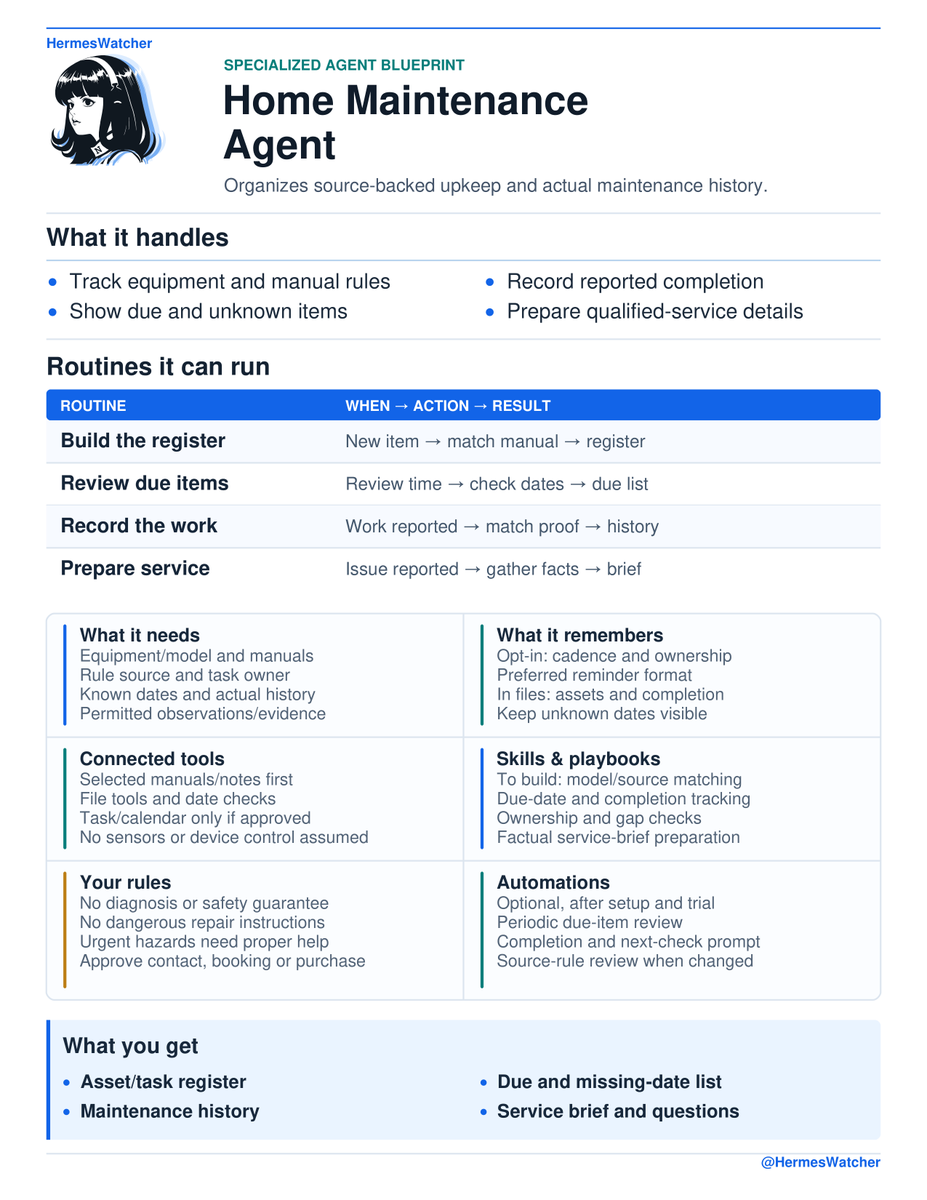
This is the shape of the "Specialized Agent Blueprint" for a Home Maintenance Agent posted on X by @HermesWatcher (x.com/HermesWatcher/status/2112182091949707365), which inspired this piece. The assistant matches each appliance to its manual, works out the next check from an approved rule plus a completion date, keeps unknown dates separate from due ones, refuses to treat a dismissed reminder as a completed job, and gathers facts into a service brief. Its key line is the same as ours: diagnosis, repairs, and any judgment about whether something is safe to use stay with qualified help.
The assistant is the easy way to run the system, not the system itself. The register, calendar, sensors and log live in your shared folder and apps, in plain files anyone can open. If it disappeared tomorrow, they would carry on without it; you would just be back to typing.
Your first weekend
Saturday morning: walk (about an hour)
- Pick three systems to start: say, heating, the water heater and the smoke alarms. Not the whole house.
- Photograph their rating plates and the three shutoffs. Talk into your phone as you go.
- Open the drawer or file where their paper lives: snap the manuals, warranty cards and any install sheets for those three. Leave the rest of the pile for later.
Saturday afternoon: hand it over
- Give the photos to your assistant and ask for the register, the filed manuals and the calendar, with a page for every interval.
- Answer its questions about last-done dates, and say "unknown" honestly where you have to.
- Tell it who owns each job, and have it put everything on the shared calendar with a weekly house check.
Sunday morning: sense
- Place leak sensors at the water heater and washing machine, and a humidity sensor in the basement.
- Build the leak and damp automations, then test each with a wet cloth or a humid shower.
Sunday afternoon: try it
- Forward one old invoice, photograph one paper receipt, or say one job out loud, and watch the log and the next reminder update.
- Ask for the "unknown" list, then photograph any remaining receipts or booklets that fill a gap, or book an inspection to establish a starting date.
- Then stop. Live with it for a few weeks before adding more systems, more sensors or any new automation.
Sources and further reading
- HermesWatcher, "Specialized Agent Blueprint: Home Maintenance Agent," X: x.com/HermesWatcher/status/2112182091949707365
- NFPA, "Installing and maintaining smoke alarms": nfpa.org
- U.S. EPA, "A Brief Guide to Mold, Moisture and Your Home": epa.gov